

• No Watermark
  • HD Quality
  • 100% Free
  • No Login Required

TikTok Video Downloader

How to Download TikTok Videos Without Watermark

Follow these 3 simple steps to save any TikTok video to your device

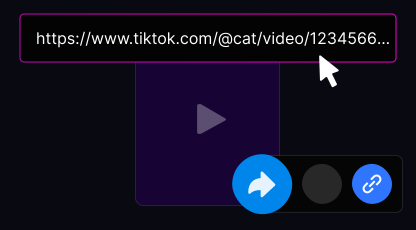
  1. Find and Copy the TikTok Link

    Find and Copy the TikTok Link

    Open the TikTok app or website, find the video you want to save, tap the Share button, and select Copy Link.

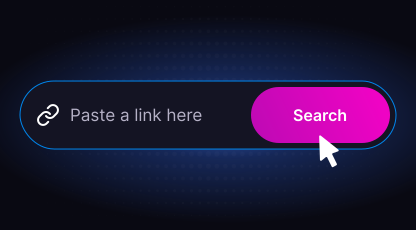
  2. Paste the Link Here

    Paste the Link Here

    Open ttdownloader.video on your device. Click the Paste button or press Ctrl+V / Cmd+V to paste the copied link. Select your preferred quality and format.

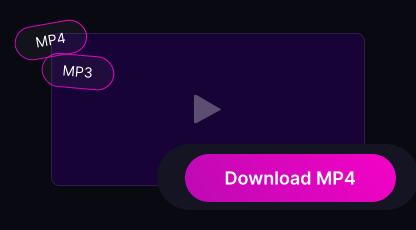
  3. Download Your Video

    Download Your Video

    Click the Download button, wait 3–5 seconds for processing, then choose HD, SD, or MP3 and save your file.

How to Download on iPhone/iPad
  • iOS 13+: downloaded files are saved to the Files app → Downloads folder
  • Use Safari browser for best experience
  • Older iOS versions may require a third-party file manager
How to Download on Android
  • Works on all Android versions
  • Files are saved to your Downloads folder automatically
  • Compatible with Chrome, Firefox, Opera, and Samsung Internet
How to Download on PC/Mac
  • Works in all major browsers: Chrome, Firefox, Safari, Edge, Opera
  • No software or extensions required — everything in your browser
  • Compatible with Windows, macOS, Linux, and ChromeOS

Download Format Details

Compare available formats and features for each TikTok content type

Feature Video Audio/MP3 Story Slideshow
Output Format MP4 MP3 MP4 MP4 or JPG
Max Resolution 4K (2160p) N/A (Audio) 1080p 1080p
No Watermark
Preview Available
Typical File Size 5–50 MB 1–5 MB 2–10 MB 1–3 MB/img
Processing Time 3–10 sec 2–5 sec 2–5 sec 5–15 sec
Best For Offline viewing Saving sounds Temp content Photo collections
  • Download TikTok videos on your smartphone

    Save TikTok videos on any smartphone — iPhone or Android — directly through your browser. No apps or installations needed.

    Open TikTok, copy the video link using the Share button, paste it into TTDownloader, and tap Download to save the video in MP4 format without watermarks.

    TTDownloader makes TikTok video downloads quick, simple, and accessible on all mobile devices.

  • Online TikTok downloader for PC

    Download TikTok videos easily on any PC or laptop. TTDownloader works in all popular browsers without requiring additional software.

    Just copy the TikTok video link, paste it into the input field on ttdownloader.video, and download your video in high quality without watermarks.

    Compatible with Windows, macOS, and Linux. Works smoothly in Chrome, Firefox, Safari, and Edge.

Why Choose TTDownloader?

TTDownloader is a fast, secure, and free TikTok downloader. Download videos without watermarks or limits and choose between MP4 video or MP3 audio formats.

  • Unlimited Downloads

    Unlimited Downloads

    Download as many TikTok videos as you want without any restrictions. No daily limits, no caps.

  • Lightning Fast

    Lightning Fast

    Downloads complete in seconds via optimized servers, even on slower connections.

  • No Watermark

    No Watermark

    Download clean videos without TikTok watermark. Crystal-clear quality preserved.

  • Safe & Secure

    Safe & Secure

    No login required, no data stored, 100% anonymous. Your privacy is protected.

  • All Devices

    All Devices

    iPhone, Android, Windows, Mac, Linux — works on any device with a browser.

  • HD & 4K Quality

    HD & 4K Quality

    Up to 4K resolution when available. Original quality is always preserved.

Why TTDownloader Stands Out

There are many TikTok downloaders available, but TTDownloader focuses on speed, simplicity, and clean results. Enjoy fast processing, unlimited downloads, and full compatibility across devices.

  • Fast, high-quality downloads in seconds

  • Completely free with unlimited usage

  • No watermark on downloaded videos

  • Simple and user-friendly interface

  • Support for MP3 and MP4 formats

  • Works on PCs, tablets, and smartphones

  • No login required — safe and secure

  • Fully anonymous — no data tracked or stored

Limitations

TTDownloader only supports public TikTok accounts. Videos from private profiles cannot be downloaded due to privacy limitations.

Frequently Asked Questions

  • Is this TikTok downloader really free?

    Yes, TTDownloader is 100% free. There are no hidden fees, no premium tiers, and no download limits. The service is supported by minimal, non-intrusive advertising.

  • How do I download TikTok videos without watermark?

    Copy the TikTok video URL, paste it into the input field above, and click Download. Then select "Download HD MP4 (No Watermark)" from the results.

  • Where are downloaded TikTok videos saved?

    On iPhone: Files app → Downloads folder. On Android: Downloads folder. On PC: your browser's default download folder. You can change this in your browser settings.

  • Do I need to log in or create an account?

    No. TTDownloader works completely anonymously. No personal data is stored and no download history is tracked.

  • Can I download TikTok videos on iPhone?

    Yes. Use Safari (recommended) on iOS 13 or later. Downloaded files are saved to the Files app. For older iOS versions, you may need a third-party file manager.

  • Is downloading TikTok videos legal?

    Downloading TikTok videos for personal, non-commercial use is generally permitted. Always credit the original creators if you repost their content, and respect copyright laws.

  • Can I download private TikTok videos?

    No. Only publicly available TikTok videos can be downloaded. Private videos are protected by TikTok's privacy settings.

  • What video quality is available?

    TTDownloader preserves the original video quality. Depending on the source, downloads may be available in SD (480p), HD (720p), Full HD (1080p), or 4K (2160p). Auto (best available) is recommended.

  • Can I download TikTok slideshows?

    Yes. TikTok photo slideshows can be downloaded as MP4 video or as individual JPG images. Use the download options provided after processing.

  • Why is my download not working?

    Check that the URL is correct and the video is publicly available. Try disabling your ad blocker, using a different browser, or clearing your browser cache. If the issue persists, the video may have been removed by the creator.

Trusted by Millions Worldwide

  • 10M+ Videos Downloaded
  • 4.8/5 User Rating
  • 150+ Countries Served
  • 99.9% Uptime
  • "I use this for vocal practice — TikTok often has great melodies I want to warm up with or turn into a cover. Being able to save audio directly on my phone saves a lot of time."
    Lisa
    ★★★★★
  • "I use it regularly to save music for my dance classes. It works consistently well."
    Helena Novak
    ★★★★★
  • "Nice tool — downloaded a TikTok sound for my ringtone in seconds. Simple and fast."
    Andrew father
    ★★★★★
  • SSL Encrypted
  • No Data Storage
  • GDPR Compliant
  • 99.9% Uptime

The Fastest Way to Download TikTok Videos Without Watermark

Our TikTok video downloader lets you save your favorite content quickly and easily. TTDownloader removes watermarks automatically — perfect for content creators, educators, and personal viewing.

Supported Platforms and Devices

  • Mobile: iPhone (iOS 13+), iPad, all Android devices
  • Desktop: Windows, macOS, Linux, ChromeOS
  • Browsers: Chrome, Firefox, Safari, Edge, Opera

What Makes Our Downloader Different?

  • Speed: Most videos process in 3–5 seconds
  • Privacy: No account required, no data stored on our servers
  • Quality: Original resolution up to 4K is preserved
  • Simplicity: Paste, click, download — three steps, that's it

Responsible Use Guidelines

  • Only download content you have permission to use
  • Credit original creators when reposting their content
  • Respect intellectual property and copyright laws
  • Do not use downloaded content for commercial purposes without creator consent