

- TikTok Video Downloader
- NEW TikTok to MP3
- TikTok to MP4
- TikTok Story Downloader
TikTok Video Downloader
How to Download TikTok Videos with TTDownloader
-
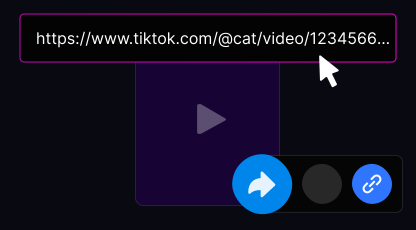
Copy the TikTok Video Link
Open the TikTok app or website, find the video you want to save, tap Share, and choose Copy Link.
-
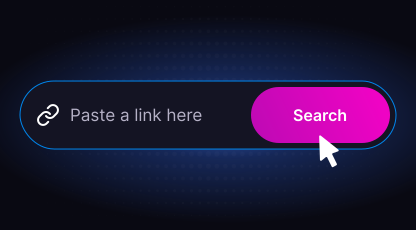
Paste the Link into TTDownloader
Open ttdownloader.video on your device and paste the copied link into the input field.
-
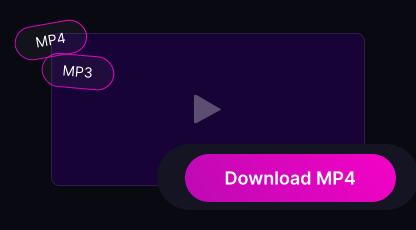
Download Your File
Select your preferred format and click the Download button. Your file will be ready within seconds.
-
Download TikTok videos on your smartphone
Save TikTok videos on any smartphone — iPhone or Android — directly through your browser. No apps or installations needed.
Open TikTok, copy the video link using the Share button, paste it into TTDownloader, and tap Download to save the video in MP4 format without watermarks.
TTDownloader makes TikTok video downloads quick, simple, and accessible on all mobile devices.
-
Online TikTok downloader for PC
Download TikTok videos easily on any PC or laptop. TTDownloader works in all popular browsers without requiring additional software.
Just copy the TikTok video link, paste it into the input field on ttdownloader.video, and download your video in high quality without watermarks.
Compatible with Windows, macOS, and Linux. Works smoothly in Chrome, Firefox, Safari, and Edge.
Why Choose TTDownloader?
TTDownloader is a fast, secure, and free TikTok downloader. Download videos without watermarks or limits and choose between MP4 video or MP3 audio formats.
-
Unlimited Downloads
Download as many TikTok videos as you want without any restrictions.
-
Fast & Simple
Save videos in seconds, even on slower internet connections.
-
No Watermarks
Clean, high-quality videos without logos or overlays.
-
Privacy-Focused
No registration, no tracking, and full anonymity.
-
Cross-Platform
Works on desktop computers, tablets, and mobile devices.
-
Easy to Use
No account required. Paste the link and start downloading.
Why TTDownloader Stands Out
There are many TikTok downloaders available, but TTDownloader focuses on speed, simplicity, and clean results. Enjoy fast processing, unlimited downloads, and full compatibility across devices.
-
Fast, high-quality downloads in seconds
-
Completely free with unlimited usage
-
No watermark on downloaded videos
-
Simple and user-friendly interface
-
Support for MP3 and MP4 formats
-
Works on PCs, tablets, and smartphones
-
No login required — safe and secure
Limitations
TTDownloader only supports public TikTok accounts. Videos from private profiles cannot be downloaded due to privacy limitations.
User Reviews About TTDownloader
-
Lisa
28.11.2025
I use this for vocal practice — TikTok often has great melodies I want to warm up with or turn into a cover. Being able to save audio directly on my phone saves a lot of time.
-
Helena Novak
22.11.2025
I use it regularly to save music for my dance classes. It works consistently well.
-
Andrew father
8.10.2025
Nice tool — downloaded a TikTok sound for my ringtone in seconds. Simple and fast.
-
martasilva_
18.09.2025
Using it for a few days now. Sometimes it takes an extra moment to load, but the quality is always good. Love that there's no sign-up 😄
-
Jonathan (jonny)
28.11.2025
I often look for unique sounds for my podcast, and TikTok has many great samples. I really appreciate that there are no limits or hidden requirements — I can download as much as I need.
-
Emilia H.
29.11.2025
I needed to download audio for a presentation — everything worked perfectly. MP3 plays everywhere. I often save beautiful sounds I discover and add them to my playlists.
Who We Are
Welcome to ttdownloader.video — a fast and convenient tool for downloading TikTok videos with no extra hassle. We focus on providing a simple and reliable way to save your favorite content in high quality and without watermarks. The service was created by a team of developers who believe that downloading TikTok videos should be quick, private, and accessible to everyone.
ttdownloader.video works directly in your browser and does not require app installation or account creation. This allows us to deliver better privacy, stable performance, and a smooth user experience.
All downloads are available in MP4 format without the TikTok watermark, making them suitable for creators, editors, students, and everyday users. If you have any questions, feedback, or need support, feel free to contact us — we're always happy to help. [email protected]
Frequently Asked Questions
-
Where are downloaded TikTok videos saved?
Downloaded files are usually stored in your browser's default download folder. You can change this location in your browser settings.
-
Do I need to install any software?
No. TTDownloader works entirely in your browser without any installations.
-
Is TTDownloader free to use?
Yes. The service is completely free with no hidden costs or limits.
-
Can I download videos from private TikTok accounts?
No. Only videos from public TikTok profiles are available for download.